Tracking bundle stock separately makes numbers drift
If you stock a bundle as a product of its own, selling it doesn't reduce the items inside. Or the other way round: one component runs out and the bundle still looks available, so you accept an order you can't actually fulfill.
Fixing it by hand works, but updating several items after every sale is tiring and error-prone. The more bundles you have, the faster it gets out of control.
Bundle stock = the scarcest component
You mark a product as a bundle and add its components with how many of each it needs. The bundle's stock is each component's available quantity divided by the amount required; the lowest result is the bundle's stock.
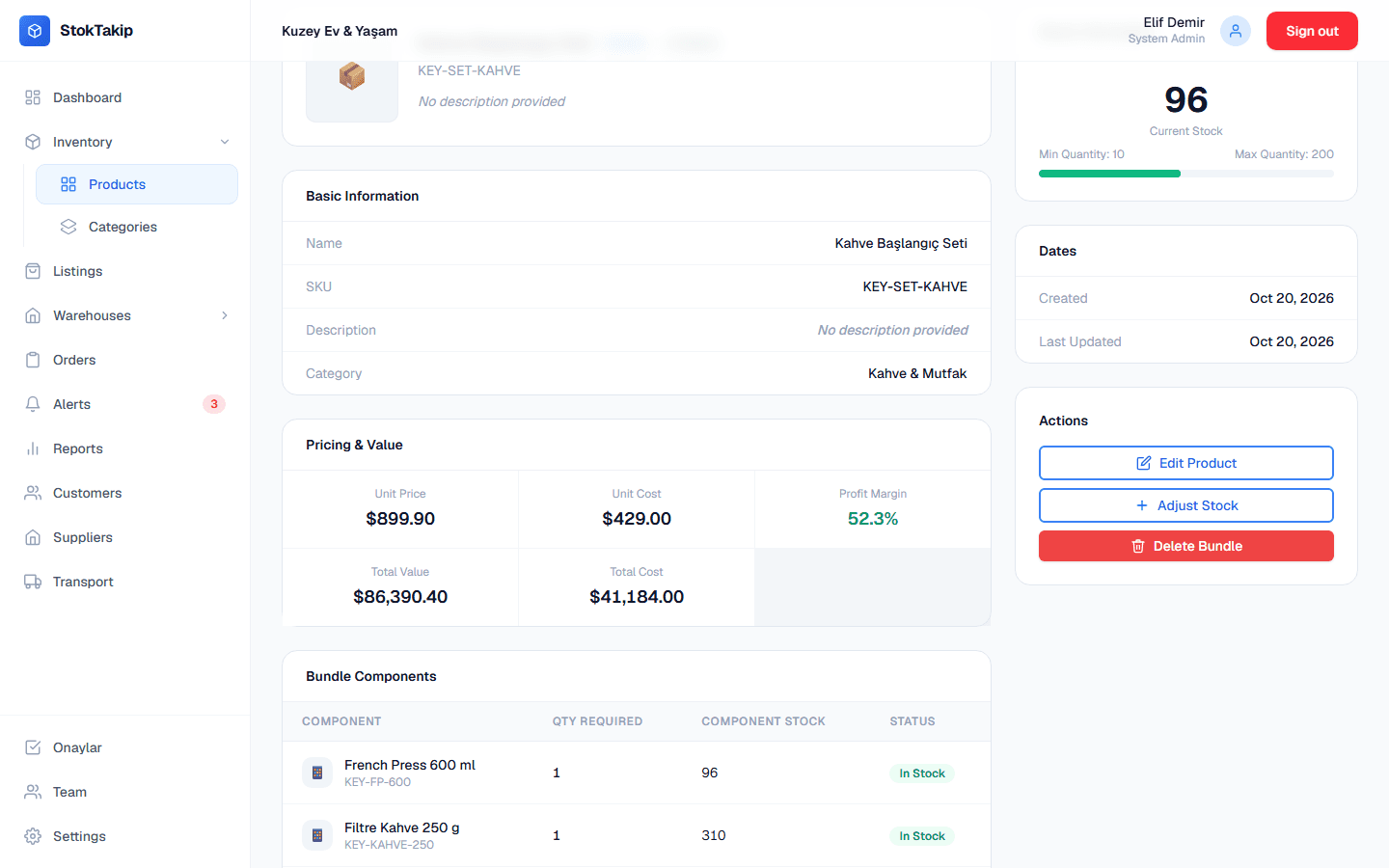
For example, a coffee kit with 1 French press, 1 bag of coffee and 2 mugs, with 96 presses, 310 bags and 420 mugs in stock, has a stock of 96. When a component's stock changes, the bundle's stock updates automatically.
When a bundle is sold on a sales order, every component is deducted in the same step; if the order is cancelled, the components go back into stock. When pricing a bundle, you also see a suggested price calculated from its components' prices.
How it works
Create the bundle
Mark a new product as a bundle and enter its name, SKU and price.
Add components
Pick the products that go into it and how many of each.
Watch the stock
The bundle's stock is calculated from its components; the product detail shows component stock alongside.
Sell it
Add the bundle to a sales order; component stock is deducted when the order is created.
Details
- Bundle stock is calculated from component stock and updates when it changes.
- Selling deducts every component in one step; cancelling adds them back.
- A suggested bundle price is calculated from component prices.
- A bundle can't contain another bundle; deleted products can't be components.
- Bundles can have marketplace listing content too.
In practice: working with bundles
Bundles shine in campaigns: the same products can appear in several bundles. Since each bundle calculates its stock from its components, when a shared component runs low every bundle containing it drops too, and none gets oversold.
Enter component quantities carefully. Leaving the quantity at one for a two-mug kit overstates the bundle's stock. The component table shows each component's stock next to the amount required, so the check is easy.
Use the suggested price as a starting point. The sum of the components' individual prices is also a good reference to show customers the bundle's value; pricing the bundle a bit below it is common practice.
To increase a bundle's stock you work on its components, not the bundle. Setting minimum stock levels on components is the easiest way to see a bundle running out ahead of time.
When a bundle is added to a sales order, its components leave stock as soon as the order is created and come back if it's cancelled, so bundle sales and single-item sales share the same stock pool correctly.
Frequently asked questions
Can I put a bundle inside another bundle?
No. To keep things clear, bundles are made of regular products only; a bundle can't contain another bundle.
What happens if an order with a bundle is cancelled?
The bundle's components are added back to stock and the bundle's stock is recalculated.
How should I price a bundle?
StokTakip shows a suggested price: each component's price times the amount the bundle needs, added up. Discounts and promotions are your call.
Can I change a bundle's stock by hand?
No, since it's calculated from the components. To increase it, update the components' stock.
What happens if a component runs out?
Since the bundle's stock follows its scarcest component, when one runs out the bundle's stock drops to zero. When the component is restocked, the bundle's stock comes back on its own.
Can I list bundles as their own products on marketplaces?
Yes. Bundles get base content, images and marketplace channel records like any product, with their own title and description.
Related features
Product variants
Generate variants from attributes like color and size, with their own SKU, price and stock.
Learn moreOrder tracking
Sales, purchase and return orders with a status flow, history and stock reservation.
Learn moreMarketplace product management
Channel-specific product content for Trendyol, Hepsiburada, Amazon TR, n11 and Çiçeksepeti.
Learn more