Noticing too late
In busy periods nobody can check spreadsheets row by row to see what's running low. For items with long lead times, a late warning means weeks without sales.
And when an item is restocked, old warnings linger, so it's unclear which ones still matter.
Minimum stock levels and self-managing alerts
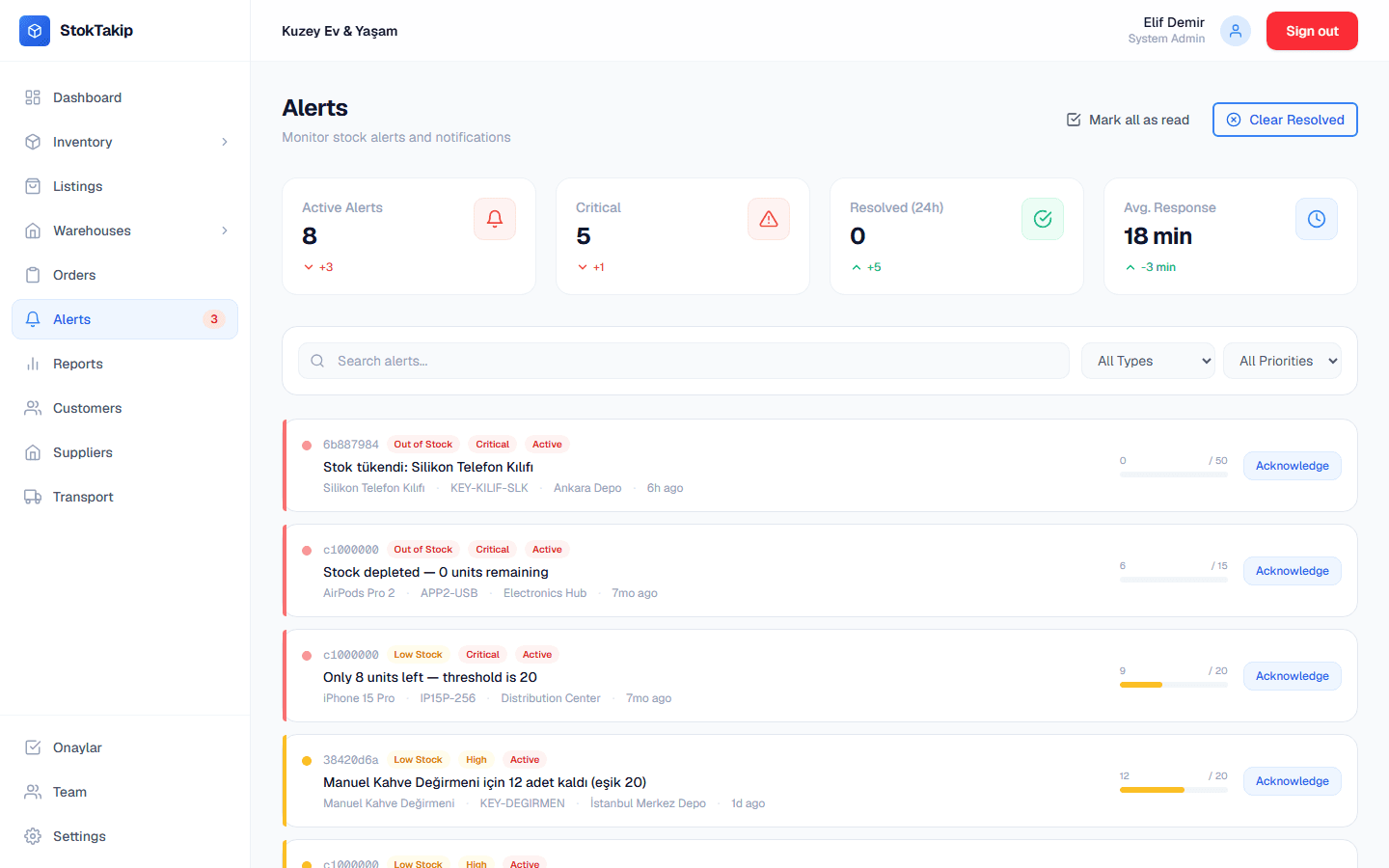
You set a minimum stock level for each product. When stock drops below it, a "low stock" alert is created automatically; when it hits zero, an "out of stock" alert. Low-stock alerts have high priority, out-of-stock alerts critical.
When stock rises above the minimum again, open alerts resolve themselves. When a product goes from low to out of stock, its old alert closes too, so the list only shows alerts that still apply.
On the Alerts screen you filter by type and priority and search by product or warehouse. You can acknowledge an alert or close it as resolved. The number of open alerts shows in the sidebar, and low-stock products appear on the dashboard.
How it works
Set minimum stock
Enter a minimum stock level when you add or edit a product.
Watch alerts
When stock drops below it, an alert shows on the Alerts screen and the dashboard.
Prioritize
Filter critical and high-priority alerts and acknowledge the ones you've seen.
Restock
When the product is back in stock, the alert resolves itself.
Details
- Alert types: low stock (high priority) and out of stock (critical priority).
- Alerts are created automatically when a product is created or its stock changes.
- Open alerts resolve themselves when stock rises above the minimum.
- Acknowledge alerts or close them as resolved.
- Filter by type and priority; search by product, SKU or warehouse.
In practice: choosing the right minimum stock level
The minimum should cover what you sell during your supplier's lead time. If you sell about five a day and delivery takes ten days, a minimum of at least fifty is a sensible start.
Use higher thresholds for fast sellers with long lead times and lower ones for slow, easy-to-source items. Raising thresholds on best sellers before a campaign gets you the warning earlier.
Treat the Alerts screen as a daily checklist. Handle critical ones, the items that ran out, first, and acknowledge alerts you've already reordered so nobody on the team orders the same item twice.
The best sellers list in Reports is a good place to start reviewing minimums; checking thresholds on the products that carry revenue reduces surprise sell-outs.
If you sell bundles, set minimum stock on their components: a component running low means every bundle using it will soon run out, so the warning on the component protects your promo packs.
Frequently asked questions
Are alerts sent by email or SMS?
Not currently. Alerts appear in the dashboard, on the Alerts screen, with the number of open alerts in the sidebar.
Can the threshold differ per product?
Yes. The minimum stock level is set per product; pick a higher threshold for fast sellers.
Do I have to close an alert by hand after restocking?
No. Low-stock and out-of-stock alerts resolve themselves once stock rises above the minimum.
Do bundles get alerts too?
A bundle's stock comes from its components, so tracking happens on the components: set minimum stock on them to see a bundle running out ahead of time.
How is an alert's priority set?
Low-stock alerts, created when stock drops below the minimum, are high priority; out-of-stock alerts, created when it hits zero, are critical. Filter by priority on the Alerts screen to handle the most urgent first.
What does acknowledging an alert do?
It tells your team someone has seen it and is on it, so nobody reorders the same item twice. The alert still resolves itself once you restock.
Related features
Multi-warehouse management
Stock per warehouse, zones, capacity and transfers between warehouses.
Learn moreOrder tracking
Sales, purchase and return orders with a status flow, history and stock reservation.
Learn moreReports
Best sellers, monthly revenue and order trends, stock movements, warehouse and category breakdowns.
Learn more